

A reliable data cabling plan doesn’t start with choosing a cable. It starts with deciding which devices need a dependable connection and where they’ll be used. For data cabling installation Southend homes and businesses can rely on, that first step helps avoid misplaced sockets, awkward routes and choices that don’t suit the property.
If you’re unsure whether wired connections will make a difference, start by looking at how you use each device. Wi-Fi is convenient for phones, tablets and equipment that moves around. A wired link can be a practical option for fixed equipment, such as a home-working computer, smart TV or business device. Planning routes before decorating or refurbishing can also make installation easier to coordinate.
This guide explains how to map rooms and devices, compare Ethernet cabling with fibre and Wi-Fi, and plan connection points before work begins. You’ll also learn what project details help shape a clear, tailored quote. Essex Home Electricians installs data cabling in Southend as part of home and business network projects, with the layout planned around the property and intended use.
Table of Contents
How is data cabling planned and installed in a Southend property?
Ethernet cable or fibre: which data cabling suits your Southend project?
Arrange data cabling installation in Southend with a clear project scope
How data cabling in Southend benefits a property
Data cabling creates fixed connections between network points in a property and the devices that use them. Instead of relying on a wireless signal for every connection, selected equipment can join the network through a physical cable and a dedicated socket or termination point.
Structured cabling is an organised system of connection points and cables that links devices to a property’s network. Its layout is planned around how people use the building, rather than treating each cable as a separate, improvised connection. The structured cabling principles provide an overview of how an organised network links equipment and connection points.
Which devices and rooms can benefit from wired connections?
Start with the places where a steady network connection matters most. A home office may need points for a desktop computer, printer and other network equipment. A lounge could benefit from a connection for a television or games console, while a shared workspace might need several points where people regularly work. In a business, relevant equipment could include office computers, printers and network hardware.
For example, a Southend household with someone working from home might prioritise a connection beside the desk, then consider the television or other regularly used devices. A small business could focus on shared work areas, with connection points positioned around its equipment and day-to-day layout. The useful number and position of points depend on the property and the devices in use.
Data cabling or Wi-Fi: what is the difference?
Ethernet cabling provides a physical connection between a device and the network. Wi-Fi connects devices wirelessly, making it convenient for phones, tablets and equipment that moves around. One doesn’t have to replace the other. Wired points can complement a wireless network by serving fixed computers or televisions, while Wi-Fi remains available for portable devices.
A wired connection doesn’t automatically mean better performance in every situation. The result depends on the equipment, network setup and connection being used. Wi-Fi may suit devices that need flexibility; cabling may be worth considering for fixed equipment used regularly or for tasks where a consistent link is a priority.
For a data cabling installation in Southend, think about how each device is used, not simply how many sockets you can add. Mark where computers, printers, televisions and network equipment are likely to sit. Consider how rooms are shared and whether device positions may change. This practical map helps distinguish essential wired points from areas where Wi-Fi is sufficient, so the installation has a clear purpose without assuming every room needs the same arrangement.
How is data cabling planned and installed in a Southend property?
A well-planned installation starts with how you use the property, then works through device positions, practical routes and the agreed scope. This keeps decisions focused on useful connections rather than adding points without a clear purpose. Planning also helps coordinate the work with decorating, refurbishment or other electrical projects.
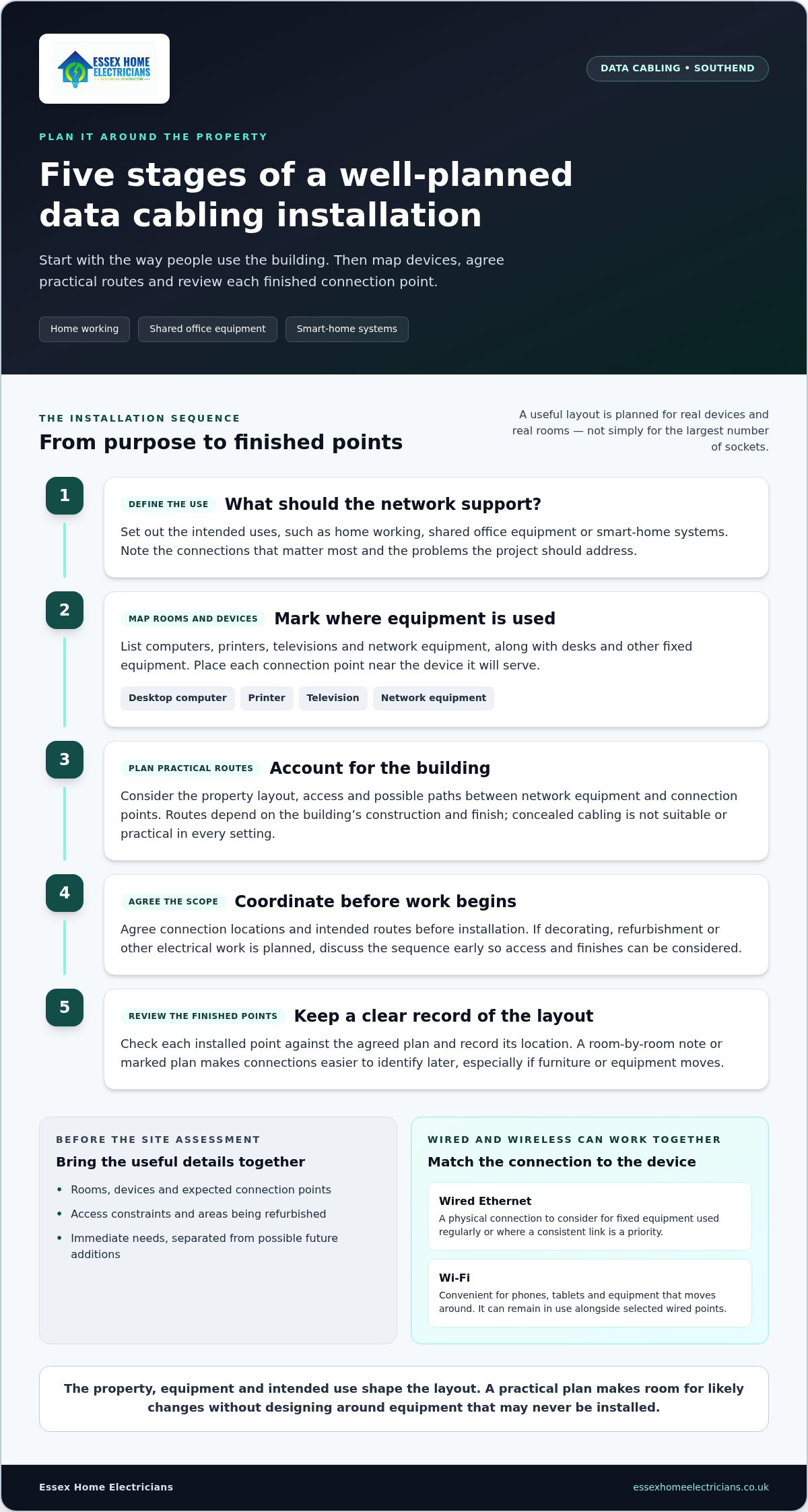
The main stages are to define the network’s purpose, map devices, agree cable routes, install the connections and review each finished point.
Define the use. Set out what the network needs to support, such as home working, shared office equipment or smart-home systems. Note which connections matter most and what problems you want the project to address.
Map devices and rooms. Mark where computers, printers, televisions and network equipment are used now. Include the likely positions of desks and other fixed equipment. A socket is most useful when it is near the device it serves.
Plan practical routes. Consider the building layout, access and possible paths between network equipment and connection points. Routes depend on the property’s construction and finish. Concealed cabling isn’t suitable or practical in every setting.
Install to the agreed scope. Once the connection points and routes are agreed, installation can proceed around the property’s requirements. If decorating or refurbishment is planned, discuss the sequence early so access and finishes can be considered in the plan.
Review the finished points. Check each installed point against the agreed layout and record its location. A room-by-room note or marked plan makes it easier to identify connections later, especially if furniture or equipment moves.
What should a site assessment consider?
Prepare a list of rooms, devices and connection points you expect to use. Add access constraints or features that could affect routes, such as areas being refurbished or rooms with limited access. Separate immediate needs from possible future additions. This helps keep the plan practical: make room for a likely change, but avoid designing around equipment you may never install.
The property itself shapes the options. A route that works in one Southend home may not suit another, and a small business workspace will have different access and equipment needs from a family home. The assessment brings those details together before the scope is settled.
What happens during installation and handover?
Before work begins, agree the connection locations and intended routes so everyone understands the scope. Installation details follow the property and project, rather than a fixed layout applied to every building. Standards bodies support consistent, interoperable technology; the IEEE’s work on standards explains their broader role in electrical and electronic engineering.
At handover, keep a record of completed network points and where they are located. If you’re planning data cabling installation in Southend, sharing your property type, room list, devices and timing helps shape a project-specific quote. Essex Home Electricians installs data cabling in Southend and surrounding Essex towns. You can request a cabling project quote.
Ethernet cable or fibre: which data cabling suits your Southend project?
Ethernet and fibre are both used to connect network equipment, but they suit different layouts and requirements. In building networks, Ethernet commonly uses copper cabling, with labels such as Cat5e, Cat6 and Cat6A identifying cable categories. Fibre-optic cabling is a separate option that carries data through optical fibres. The right choice depends on the devices, property layout and wider network design, not simply which label sounds newest.
Cat5e, Cat6, Cat6A and related labels describe categories of Ethernet cable. A higher category isn’t automatically the best fit. The useful choice depends on what the connected equipment supports, what the network needs to do and how the installation is designed. Choosing a category without considering those factors can mean focusing on a specification that doesn’t serve the actual project.
When might Ethernet cabling be the practical choice?
For a home office, Ethernet may be worth considering for a desktop computer, printer or other fixed equipment used throughout the working day. Planned connection points can reduce reliance on wireless links for those selected devices, while leaving Wi-Fi available for phones and portable equipment. The suitable category and layout depend on the devices and network requirements, so plan around the equipment rather than choosing a cable label in isolation.
When should fibre-optic cabling be considered?
Fibre is a distinct cabling option that may suit particular network arrangements, such as a link between network equipment or across a larger property. Whether it belongs in the plan depends on the scale and layout of the building, the intended connection and the equipment at each end. Its capabilities vary with the fibre type and system design, so technical requirements need to be assessed for the specific project.
For data cabling installation in Southend, start by listing the equipment and connections the network needs to support. Then consider where each cable must run and how it will fit the wider setup. Ethernet may suit planned points for everyday fixed devices; fibre may be relevant to a different part of the network. A clear project scope makes that comparison more useful than automatically selecting the newest or highest-numbered category.
How to prepare a Southend home or business for data cabling
A useful project brief doesn’t need technical jargon. Start with the devices you use, where they’re located, what connection problems you notice and any changes planned for the property. These details help define the installation scope around your priorities, rather than assuming every room needs the same setup.
Before discussing data cabling installation in Southend, gather a few practical notes:
Devices: List computers, printers, televisions, network equipment and smart-home devices that may need a wired connection.
Room locations: Note where equipment is used, including desks, shared work areas and entertainment spaces.
Current issues: Describe where connections are unreliable or inconvenient, and which devices are affected.
Planned changes: Include decorating, refurbishment, new furniture layouts or changes to how rooms will be used.
Priorities: Separate essential connection points from useful extras or possible future additions.
A homeowner’s room-by-room planning checklist
Walk through the property and note where work, entertainment and network equipment are based. In a home office, record the desk position and the devices used there. In a lounge, note where a television or other fixed equipment sits. If you’re renovating, mark furniture that will move and rooms that may change purpose. These notes help inform point locations and routes without requiring you to assess technical compliance yourself.
Include smart-home plans alongside your wider electrical requirements. For example, note any equipment you expect to add or relocate, then share those plans as part of the project brief. This keeps network points in context with other electrical work. Essex Home Electricians also provides domestic and commercial electrical services, which can be relevant when cabling forms part of broader property plans.
Planning cabling for a Southend workplace
For a small business workspace, list the people and work areas that need network access, along with shared equipment such as printers. A reception desk, meeting space and staff workstations may have different connection needs. Note how the layout could change if the business reorganises or adds work areas, but distinguish likely plans from possibilities so the scope stays practical.
Network cabinets, patch panels or fibre may be relevant to some projects, but they aren’t automatic requirements for every workplace. Their suitability depends on the size and layout of the network, the equipment involved and the intended connections. You don’t need to settle those technical decisions in your brief. Explain how the space is used and what the network needs to support.
Clear priorities make it easier to shape a project-specific scope. Essex Home Electricians is NAPIT-accredited, has over 20 years of experience and serves Southend, Basildon, Benfleet, Canvey Island, Rayleigh, Wickford, Billericay and Leigh-on-Sea. Request a project-specific data cabling quote with your property type, room list, devices, current issues and planned changes.
Arrange data cabling installation in Southend with a clear project scope
A clear project brief helps turn your network plans into a practical installation scope. For data cabling installation in Southend, outline what the property needs to support, which rooms and devices are involved, and what matters most. You don’t need to settle every technical detail before making an enquiry.
What information helps shape a useful quote?
Start by describing the property and how it’s used. A family home, rental property, office and shared workspace can each have different access arrangements and connection priorities. Then note the rooms where you expect to use network points and the equipment they should serve. A short, specific brief gives the project a useful starting point.
Property type: Home, rental property, office or another kind of workspace.
Rooms and devices: Where connections are needed and what equipment they’re intended to support.
Priorities: Which areas matter most for work, regular device use or business operations.
Timing and changes: Any refurbishment, decorating or layout changes that could affect access or point locations.
Wider electrical work: Other planned electrical or smart-home requirements that may be relevant to the project.
It’s also useful to mention current connectivity problems, such as a device or work area where a stable connection is a priority. If you’re unsure how many points are needed, describe the equipment and how it’s used. The installation scope can then be tailored to the property rather than based on a one-size-fits-all layout.
What happens after you make an enquiry?
Your project details guide a discussion about the appropriate scope for the property. Explain the intended devices, access considerations and any work happening alongside the cabling. Essex Home Electricians serves Southend and surrounding Essex towns, including Basildon, Benfleet, Canvey Island, Rayleigh, Wickford, Billericay and Leigh-on-Sea. The company is a NAPIT-accredited electrical contractor with over 20 years of experience, bringing electrical knowledge to projects that connect with wider property or smart-home plans.
Quotes are free and carry no obligation. The proposed scope is tailored to your requirements, so a concise brief helps keep the conversation focused on the rooms, connections and priorities that matter to you. Share what you already know and clarify the project as the discussion develops.
Ready to discuss your plans? Discuss your data cabling project in Southend and request a project-specific quote.
Make your next network step a clear one
A network plan can support the way you use a property now and leave room for changes ahead. Before moving forward, bring your priorities together: which connections matter most, what the property needs to accommodate and whether any building work could affect the plan. You don’t need to settle every technical choice alone. A clear starting brief gives the project a practical direction.
For data cabling installation in Southend, Essex Home Electricians can plan a project around your property and intended use. Share the rooms, devices and timing you have in mind, then take the next step with a free, no-obligation quote tailored to the work.
Discuss your data cabling project in Southend and move towards a network plan that fits your home or business.
Frequently Asked Questions
What is data cabling installation?
Data cabling installation sets up the physical network connections inside a property, separate from the broadband service entering it. The work can include running cable between network equipment and selected connection points, so devices can join the local network through those points. For example, a home might have a network point in a study for a computer. The final layout depends on the building and the equipment it needs to support.
Is wired data cabling better than Wi-Fi?
Neither is always better; each suits different devices and situations. A fixed device used for calls or work may benefit from a direct wired connection, while phones and tablets are more convenient over Wi-Fi. Wireless coverage can also be affected by the property layout and equipment. A combined setup can use cable for selected stationary devices and retain Wi-Fi for equipment that moves around.
Which Ethernet cable category should I choose for my home?
Choose a category based on the network equipment, intended use and plans for the property, rather than picking the highest number by default. Check what the router, switches and connected devices support, then consider whether the network may need to accommodate future changes. Labels such as Cat5e, Cat6 and Cat6A identify cable categories, but the label alone doesn’t determine the best solution for your home.
Can data cabling be installed in an existing house?
Yes, cabling can be planned for an existing house, though the practical route depends on its construction and access. Possible routes may include accessible loft or under-floor areas, or discreet surface runs where appropriate. Existing finishes and the position of network equipment can affect the approach. Sharing access constraints or rooms being redecorated helps shape a plan suited to the property, rather than assuming every cable can be concealed.
How much does data cabling installation in Southend cost?
The cost depends on the project scope, including the number and position of network points, the cable route, access and the type of setup required. A simple layout and a more involved property project won’t necessarily have the same requirements. Essex Home Electricians provides free, no-obligation quotes tailored to the work, so a project brief with rooms, devices and planned changes helps establish a relevant quote without relying on a generic per-point figure.
Do I need fibre-optic cabling at home?
Not necessarily. A home receiving full-fibre broadband doesn’t automatically need fibre cabling inside every room. The broadband connection to the property and the cabling used within its internal network are separate parts of the setup. Fibre inside the property may suit a particular network layout or equipment requirement, but many household plans can focus on selected wired points and Wi-Fi. The right choice depends on the network design and intended connections.
Can data cabling be planned during a renovation?
Yes. Discussing cabling during renovation planning can help align proposed connection points and routes with the work already scheduled. Before finishes are completed, note where desks, televisions or network equipment are expected to sit, and flag rooms changing purpose. This gives the project a chance to consider access and sequencing alongside other electrical plans. The final route still depends on the building and agreed scope, so include any renovation dates in the project discussion.